![EFLogo_Black-1.png]](https://knowledge.edgefactor.com/hs-fs/hubfs/EFLogo_Black-1.png?width=240&height=53&name=EFLogo_Black-1.png)
What’s the Difference?
Edge Factor provides different tools and features depending on your role. Educators have access to classroom management and planning tools, while students experience a simplified environment focused on career exploration and learning.
Understanding these differences can help educators guide students more effectively and know what students see when they log in.
Educators
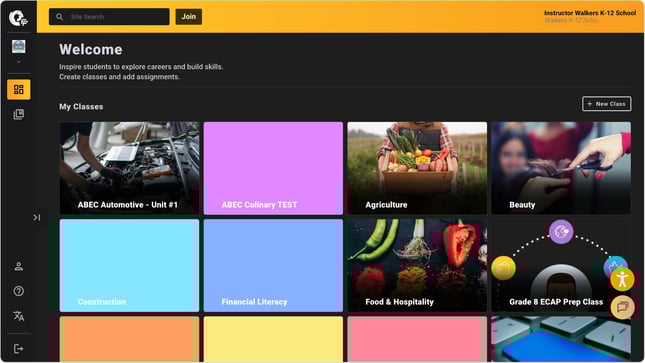
When logged in, you have access to tools designed to manage learning and assign content.
Educator features include:
-
My Classes
-
Create and manage classes
-
Add students
-
Create assignments
-
Assign content and badges
-
Review progress and grades
-
-
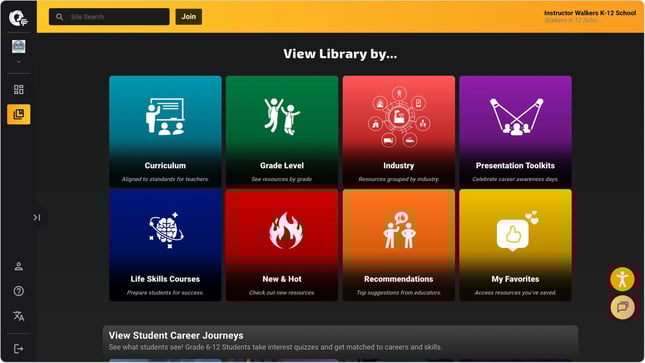
Full Library Access
-
Curriculum Pages (aligned to courses and regions)
-
Recommended For Pages (by teaching role or subject area)
-
Presentation Toolkits and Event Resources
-
Life Skills Courses (Financial Literacy, Interview 101)
-
New & Hot Content
-
Student Journey Level Pages (Grades 6–12)
-
Complete content catalog across all series and industries
-
Students
Have a simplified experience focused on discovering careers and completing assigned work.
Student features include:
Library

Watch Inspiring Stories: Students will spend 1/3 of their lives working - so they should do something they like! Watch real-life stories to get inspired for your future.
Explore Careers By: Students can explore careers, technical and soft skills by industry.
Learn Future-Ready skills like interviewing, financial literacy, career readiness, and essential life skills needed for success.
Students can easily access saved content anytime.
Need Help?
If you have questions about roles or the student experience, contact our Support Team at support@edgefactor.com or use the Live Chat on the platform.