![EFLogo_Black-1.png]](https://knowledge.edgefactor.com/hs-fs/hubfs/EFLogo_Black-1.png?width=240&height=53&name=EFLogo_Black-1.png)
Step-by-Step: How to Create a Free Edge Factor Account
-
Go to www.edgefactor.com

-
Click the “Log In” button in the top right corner.
-
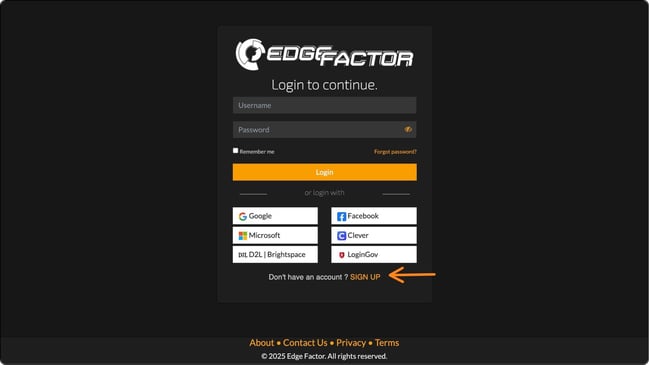
Click “Sign Up”
-
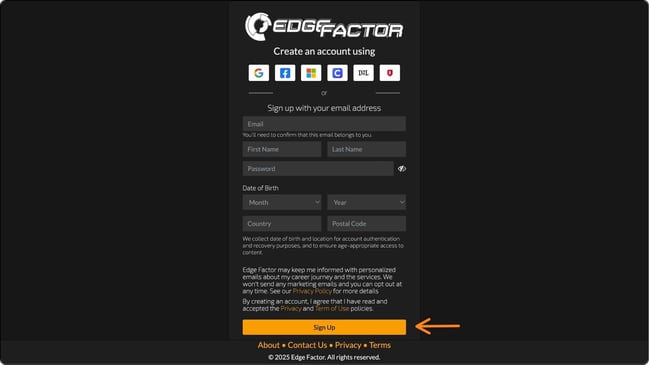
Enter your:
- Email address
- First and last name
- Desired password
-
Date of birth (this helps us make sure you see age-appropriate content)
- Country & Postal Code (this helps us show content from your area)
-
Click Sign Up
-
Check your email and click the link we send you to verify your account.
-
Once your account is verified, log in and start exploring your free Edge Factor account!
What Do You Get with a Free Account?
Free accounts give you access to:
-
Seasonal toolkits and career exploration resources
-
Monthly Learn & Earn activities and badges
- A sneak peek at how Edge Factor helps you get career-ready
Need help?
Use the chat icon in the bottom right corner, or send us an email at support@edgefactor.com